OntoCast Workflow
This document describes the document processing pipeline implemented in stategraph/create.py. After changing the node topology, regenerate workflow diagrams with uv run plot-graph.
Overview
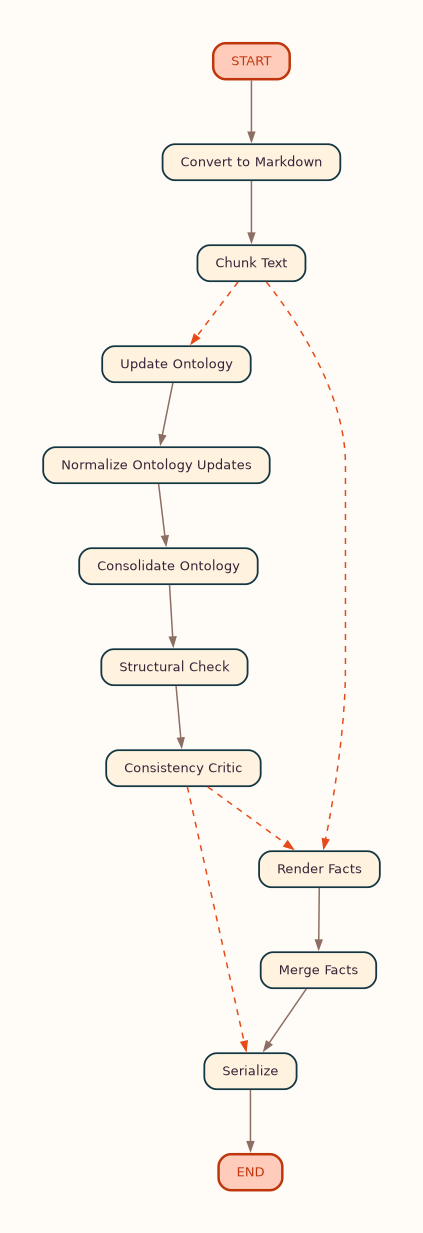
OntoCast transforms input documents into RDF ontology and facts graphs through a parallel map/reduce pipeline:
- Document conversion — PDF, DOCX, TXT, MD, or JSON → Markdown
- Chunking — prepare pipeline (segment, tag, filter, size) into content units (
--head-chunkslimits count for testing). Section tagging runs by default (CHUNK_SECTION_CLASSIFIER);target_sections/exclude_sectionsfilter inside Chunk; optional per-unit summarization runs inside the extraction fan-out (see Structured documents) - Ontology map/reduce (when
render_modeincludes ontology): - Per-unit context assembly (catalog selection or vector retrieval)
- Render/critic loops with optional web evidence
- Reduce: each unit's
GraphUpdates replay against its prompt snapshot into a net insert/delete delta; deltas union across units (a triple inserted by any unit vetoes another unit's delete of it), partition by namespace ownership, and apply delete-first onto the owning catalog terminals - Global normalize (provenance split) → optional consolidate → structural check → consistency critic
- Facts map/reduce (when
render_modeincludes facts): - Per-unit render/critic loops
- Merge facts across units with entity disambiguation
- Serialize — write to triple store and return Turtle in the API response
Document-Level Graph
The LangGraph compiled by create_agent_graph() is rendered from the live workflow. Regenerate after graph changes:
Outputs (under docs/assets/):
| File | Layout | Description |
|---|---|---|
| graph.png | Top-to-bottom | Full document pipeline (default) |
| graph.lr.png | Left-to-right | Same graph, landscape layout |
| graph.svg / graph.lr.svg | Vector | Scalable versions |
| graph.mmd | Mermaid source | Editable Mermaid source |


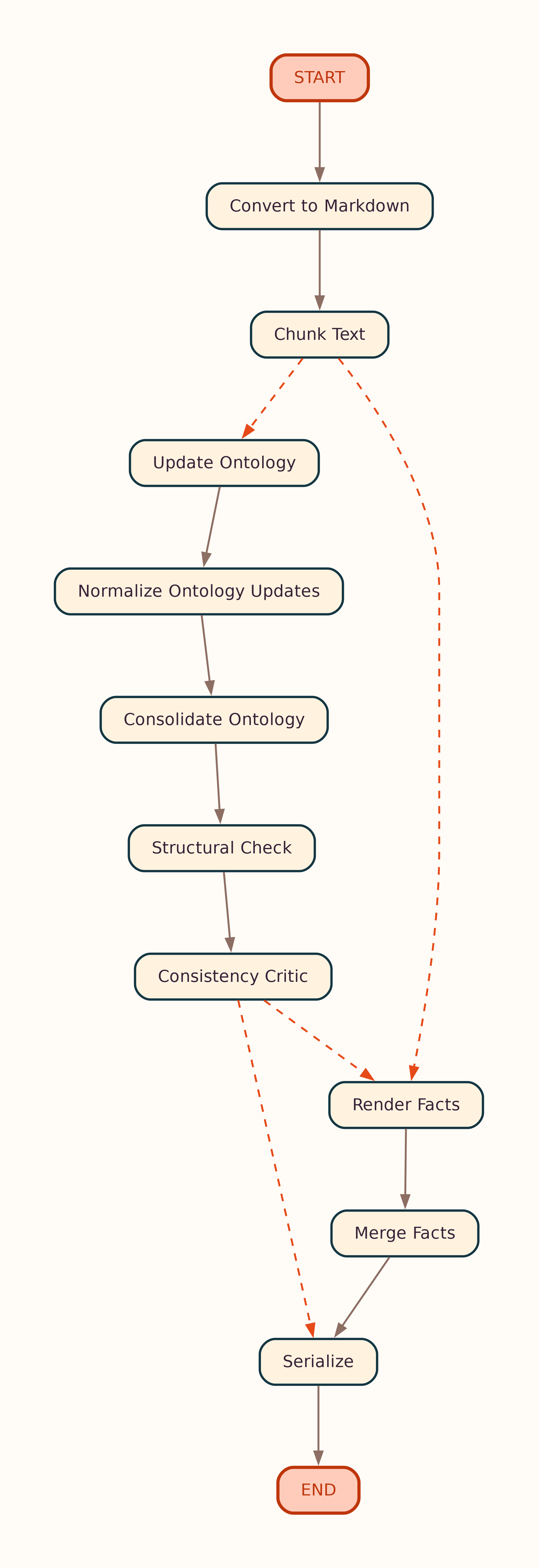
Landscape layout (LR)
Nodes such as Update Ontology and Render Facts each run the per-unit atomic loop below (in parallel across content units).
Per-Unit Atomic Loop
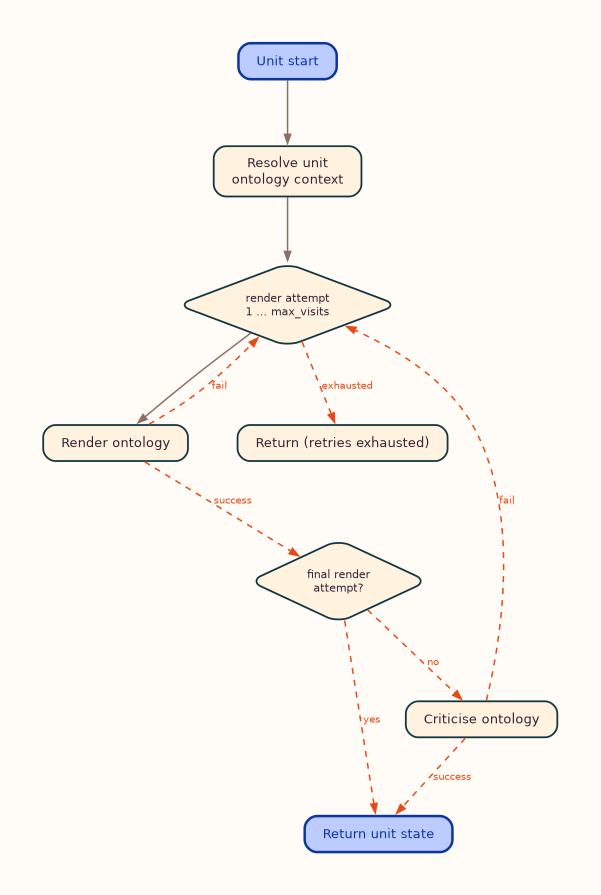
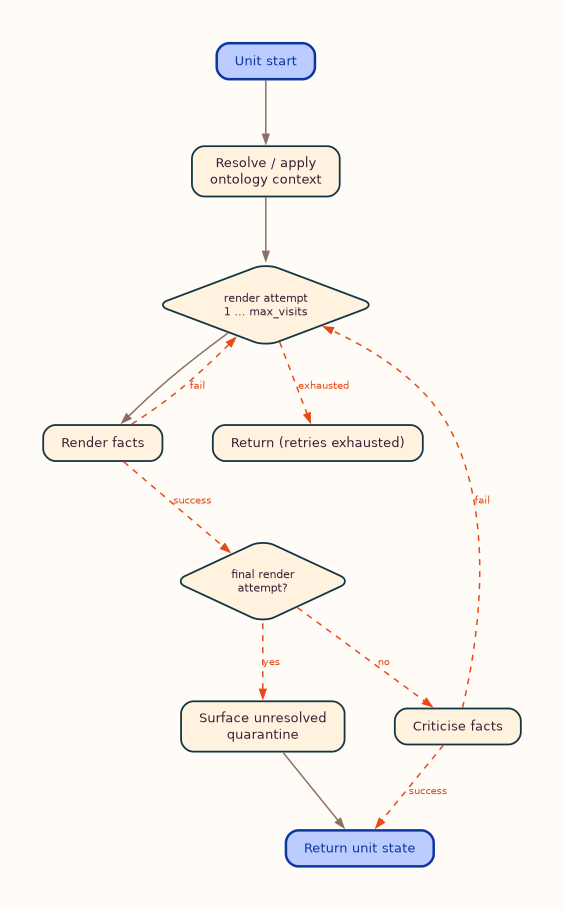
Inside stategraph/atomic.py, each content unit runs an independent render → critic loop. Ontology and facts share the same control flow; optional web-evidence branches are omitted in the default diagrams below (see _evidence variants).
Outputs (under docs/assets/):
| File | Layout | Description |
|---|---|---|
| ontology_loop.png | Top-to-bottom | Per-unit ontology loop (core path) |
| ontology_loop.lr.png | Left-to-right | Ontology loop, landscape layout |
| ontology_loop.svg / ontology_loop.lr.svg | Vector | Scalable ontology loop |
| ontology_loop.mmd | Mermaid source | Core ontology loop source |
| ontology_loop_evidence.mmd | Mermaid source | Full ontology loop with web evidence |
| facts_loop.png | Top-to-bottom | Per-unit facts loop (core path) |
| facts_loop.lr.png | Left-to-right | Facts loop, landscape layout |
| facts_loop.svg / facts_loop.lr.svg | Vector | Scalable facts loop |
| facts_loop.mmd | Mermaid source | Core facts loop source |
| facts_loop_evidence.mmd | Mermaid source | Full facts loop with web evidence |




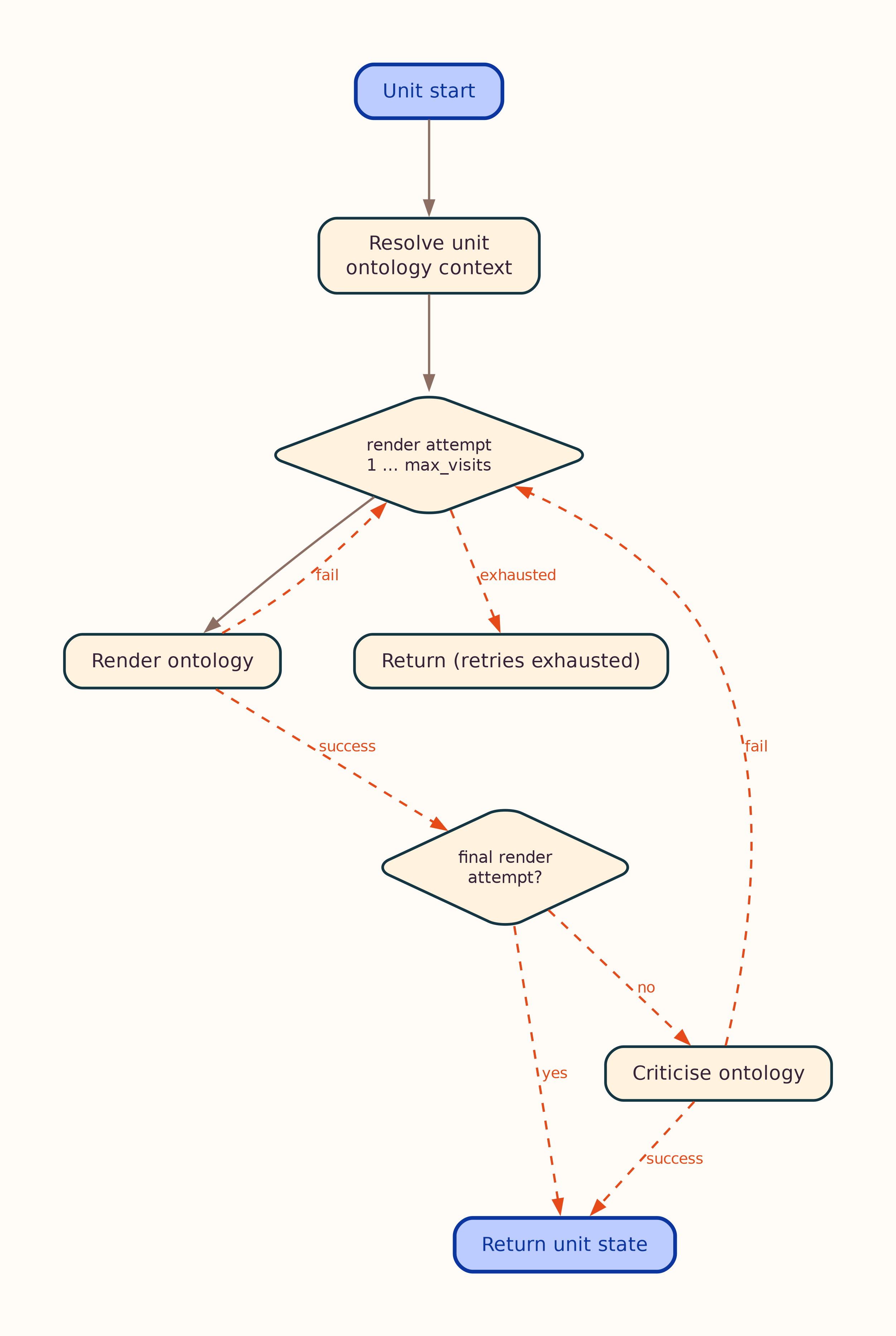
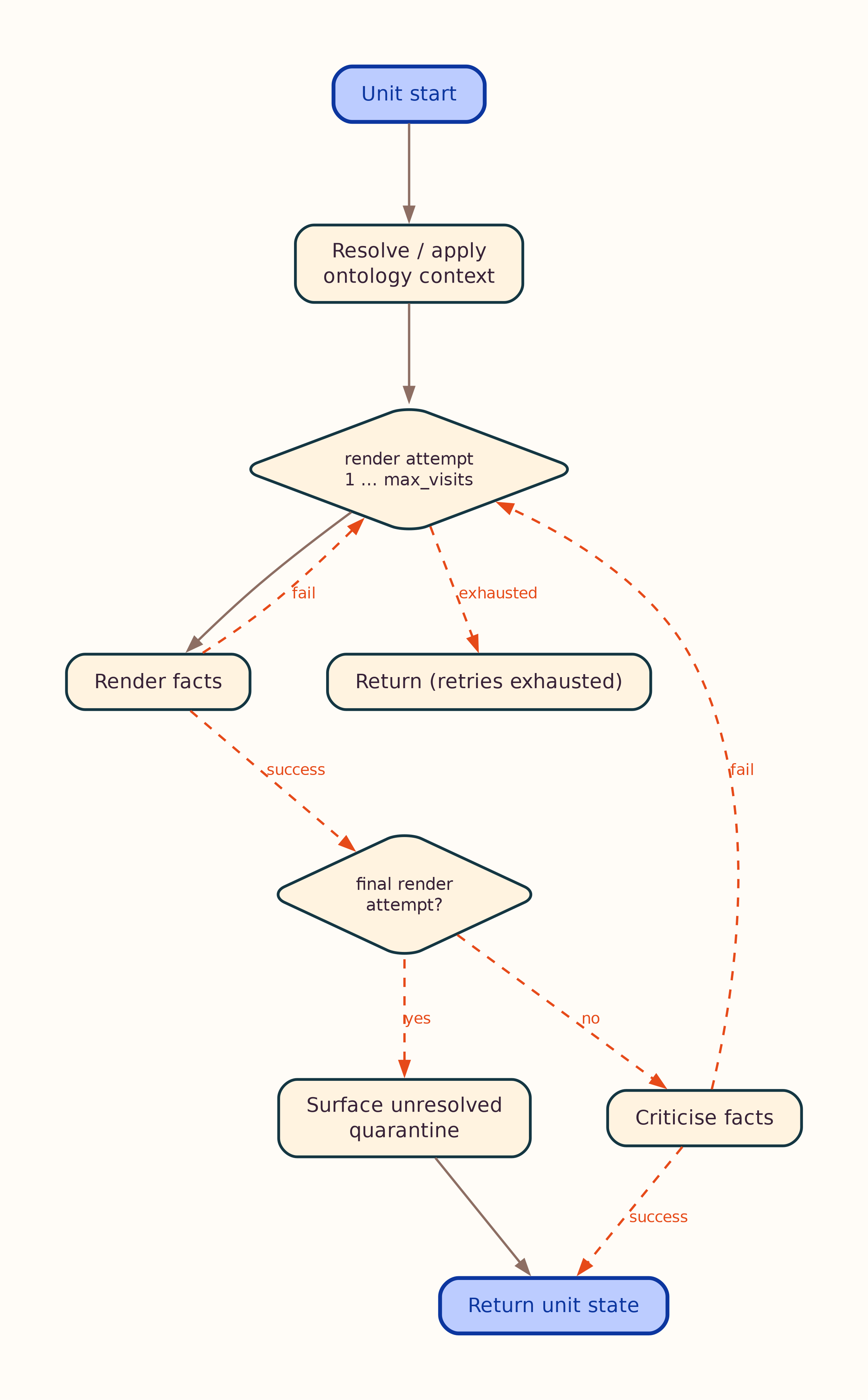
Full loops with optional web evidence
 Notes:
- Core diagrams show the default path: render/critic retries without web search. When a node sets
initiate_search, plan/fetch/retry branches apply — see*_evidence.mmd(and matching PNG/SVG). - First render/critic pass always runs without web search; search runs only when the node sets
initiate_search. - On the last allowed render attempt, the critic is skipped (no further extract to critique). The facts loop also surfaces unresolved quarantined literals on that path.
- In the facts loop a rejecting critic does not escalate to another render. Its blocking fixes are converted to findings and applied by the bounded rewrite-in-place repair pass, so the outer loop retries only on render failure and a unit's worst-case call count is flat in
MAX_VISITS. Acceptance is decided bymaterial_defects()— mandatory deterministic findings plus critic fixes atFACTS_ACCEPT_BLOCKING_SEVERITY— not by the critic's score. The ontology loop still gates on the critic's score. It now has a deterministic finding lane of its own (tool/ontology_validation/unit_findings.py), but that lane runs in shadow mode: findings are collected, injected into the critic prompt as MANDATORY items and reported asontology_findings_residual/ontology_mandatory_residual, and the gate itself is unchanged until a sampling run yields the incumbent's distribution — the same order the facts gate change followed. See Validation. /process_unitruns this loop on a single unit viaunit_pipeline.py(no chunking or document-level reduce).
Implementation: stategraph/atomic.py.
Stage Details
1. Document Input
- Accepts text, JSON (
textfield), or file uploads via/process - Converts supported formats to Markdown while preserving structure
- PDF conversion quality can be tuned via
CONVERTER_*settings; useCONVERTER_PROFILE=born_digitalfor text-selectable publisher PDFs with ligature-gap artifacts
2. Chunking (and optional structured preprocessing)
Default path: Convert → Chunk → extraction.
When target_sections and/or summarize_sections are set on /process or CLI (--target-sections, --summarize-sections):
| Node | When | What it does |
|---|---|---|
| Chunk | Always | Prepare pipeline: Docling segments (or semantic fallback), optional tag/filter/size; builds content_units |
Summarization has no node of its own. When summarize_sections is set, each
unit is summarized inside the extraction fan-out, immediately before that unit is
rendered; prompts then use extraction_text, which prefers the summary. A unit's
summary depends only on that unit, so a separate stage was a barrier that made
every unit wait for the slowest summary before any extraction could start.
- Section LLM tagging during Chunk uses parallel workers up to
PARALLEL_WORKERS - Use
--head-chunks Non the CLI to process only the first N units (testing) - Without section parameters, Chunk uses layout/simple sizing only (no tag/filter)
3. Per-Unit Ontology Loop
Each content unit runs an independent ontology loop (stategraph/atomic.py):
- Context assembly — pick or retrieve ontology context for the unit:
- LLM catalog selection (
selected_single_ontology) - Vector-store ensemble (
selected_vector_search_ontology; Qdrant or LanceDB) - Fixed catalog ontology (
fixed_single_ontology) - Render — LLM emits
GraphUpdateoperations (JSON-LD by default, or Turtle; seeLLM_GRAPH_FORMAT) - Critic — validate structure; retry up to
max_visits(config or per-request override) - External evidence (optional) — web search on retry when the node requests it
See Ontology Context and User Instructions.
4. Ontology Reduce (Document Level)
After all units finish:
| Stage | Purpose |
|---|---|
| Normalize | Merge unit deltas; split RDF 1.2 provenance/reification into a side artifact |
| Consolidate (optional) | Single-pass refinement when ENABLE_ONTOLOGY_CONSOLIDATION=true |
| Structural check | Connectivity and schema validation |
| Consistency critic | Cross-unit ontology consistency. Runs only under ONTOLOGY_CONTEXT_MODE=selected_vector_search_ontology — a no-op in the other two modes |
Provenance triples (prov:, reification, chunk metadata) are kept in ontology_provenance_artifact, not in the working ontology graph passed to consolidation.
5. Per-Unit Facts Loop
When facts rendering is enabled, each unit runs a facts loop (render → critic, with optional web evidence), then merge facts applies cross-chunk entity disambiguation and aggregation, and validate facts checks post-merge invariants (functional violations, suspect multi-values, degenerate coreference, optional SHACL). Merge-signature error findings (functional violation, suspect multi-value, degenerate coreference — never SHACL) on merged subjects trigger a deterministic un-merge: the offending cluster's pairs are vetoed and the retained facts units are re-aggregated (FACTS_MERGE_REPAIR_PASSES). Residual findings land in facts_validation_findings and the retrieval metrics.
Chunks detected as bibliography/reference lists are routed by CHUNK_BIBLIOGRAPHY_MODE: by default they are dropped before extraction (skip); citations_only yields citation metadata only (schema:ScholarlyArticle + schema:citation), never domain facts mined from citation titles.
Facts output uses the cd: namespace for text-derived instances; domain ontology IRIs are read-only schema and pre-declared reference individuals (see Facts extraction model). Optional facts_user_instruction adds focus on top of these built-in guidelines.
6. Output
- Ontology and facts serialized to the configured triple store
- API returns Turtle (optionally with
strip_provenance=trueto omit reification scaffolding) - Budget summary logged (LLM calls, cache hits, characters, triple counts)
Configuration
| Setting / parameter | Effect |
|---|---|
RENDER_MODE |
Which pipeline blocks run: ontology (no facts written), facts (catalog-only, no ontology block), or ontology_and_facts. Overridable per request — see Configuration |
PARALLEL_WORKERS |
Max concurrent unit workers |
LLM_MAX_INFLIGHT |
Max concurrent provider LLM requests (shared across units) |
MAX_CONCURRENT_PROCESSES |
Optional cap on simultaneous /process pipelines |
MAX_VISITS / max_visits |
Render/critic retry budget per loop (at 1, the default, the LLM critic never runs — the critic is skipped after the final render). In the facts loop it bounds render-failure retries: a rejecting critic no longer consumes an attempt |
FACTS_ACCEPT_BLOCKING_SEVERITY |
Which critic fix severities block a facts unit from leaving the loop (critical default, or important / never). Mandatory deterministic findings always block — see Validation |
MAX_CRITIC_VISITS_PER_NODE |
Critic attempts per render attempt. Unset couples it to MAX_VISITS; set to 1 for one critique per render. Only bites when the critic keeps requesting external evidence — see Configuration |
FACTS_LLM_REPAIR_VISITS |
Finding-driven repair budget per facts unit, in provider calls: bounded update renders driven by machine-found violations; fires even at MAX_VISITS=1, so the default costs up to two calls per unit. See Validation |
FACTS_MERGE_REPAIR_PASSES |
Un-merge budget at the post-aggregation validation gate (merge-signature error findings → cluster pair vetoes → re-aggregation) |
FACTS_SHACL_AUTOFIX |
LLM-free repair of SHACL violations at the gate: off, rewrite, or prune (default). See Validation |
CHUNK_SEGMENTER |
semantic (sections-first, default) or docling structural segments |
CHUNK_SECTION_CLASSIFIER |
Section classification cascade: heuristic (default, no LLM calls), heading, llm, or off |
CHUNK_SECTION_DENSITY |
Content-based tier for heading-free regions: conservative (default), aggressive, or off |
CHUNK_SECTION_TEXT_HEADINGS |
Detect headings in documents with no markdown heading structure (default true) |
CHUNK_SECTION_LLM_BATCH_SIZE |
Excerpts per LLM call when CHUNK_SECTION_CLASSIFIER=llm (default 40; 0 = one call per chunk) |
CHUNK_SECTION_SCHEMA_DETECT |
Infer the document-type schema when no section_schema_id/document_type_hint is given: headings (default), lexical (no model), auto (adds the weak content tier), or off |
CHUNK_SECTION_SCHEMA_DETECT_MIN_SCORE |
Evidence the winning schema must clear before detection is accepted (default 2.0) |
CHUNK_SECTION_SCHEMA_DETECT_MIN_MARGIN |
Factor by which the winner must beat the runner-up (default 1.8); below it, detection abstains to the default schema |
CHUNK_SECTION_SCHEMA_DETECT_CONTENT_MIN_MARGIN |
Stricter margin for the content tier (default 4.0) |
CHUNK_BIBLIOGRAPHY_MODE |
Routing for reference-list chunks: skip (default), citations_only, or domain_facts |
ENABLE_ONTOLOGY_CONSOLIDATION |
Optional post-normalization consolidation |
ONTOLOGY_CONTEXT_MODE |
How per-unit ontology context is sourced; also gates the consistency critic — see Configuration |
LLM_GRAPH_FORMAT |
LLM wire encoding: jsonld (default) or turtle (legacy) |
--max-visits |
CLI override for MAX_VISITS (batch mode and server default) |
--wipe-vector-store |
Drop the current vector partition before recreate+reindex |
--head-chunks |
CLI limit on units processed |
target_sections / summarize_sections / summary_max_sentences |
Per-request structured-document preprocessing (not env vars) |
Full reference: Configuration System.
Best Practices
- Start with defaults —
MAX_VISITS=1,ontology_and_facts, consolidation off; tune after inspecting output. - Use
--head-chunksfor large documents during development. - Monitor budget summaries to estimate LLM cost at scale.
- Provide seed ontologies in
ONTOCAST_ONTOLOGY_DIRECTORYfor catalog selection modes. - Enable vector mode only when Qdrant or LanceDB and embeddings are configured.
Next Steps
- Core Concepts — GraphUpdate, provenance, disambiguation
- API Endpoints —
/process,/process_unit, parameters - API Reference —
AgentStateand workflow types